


Zero Trust Overview and Preparation in M365
In this YouTube video, we will explain the Zero Trust security model and what you need to prepare for Microsoft 365 environments. Traditional network security was built for a world that no longer exists.
Author: bha created on 2026-04-10
Thank you
What is Zero Trust?
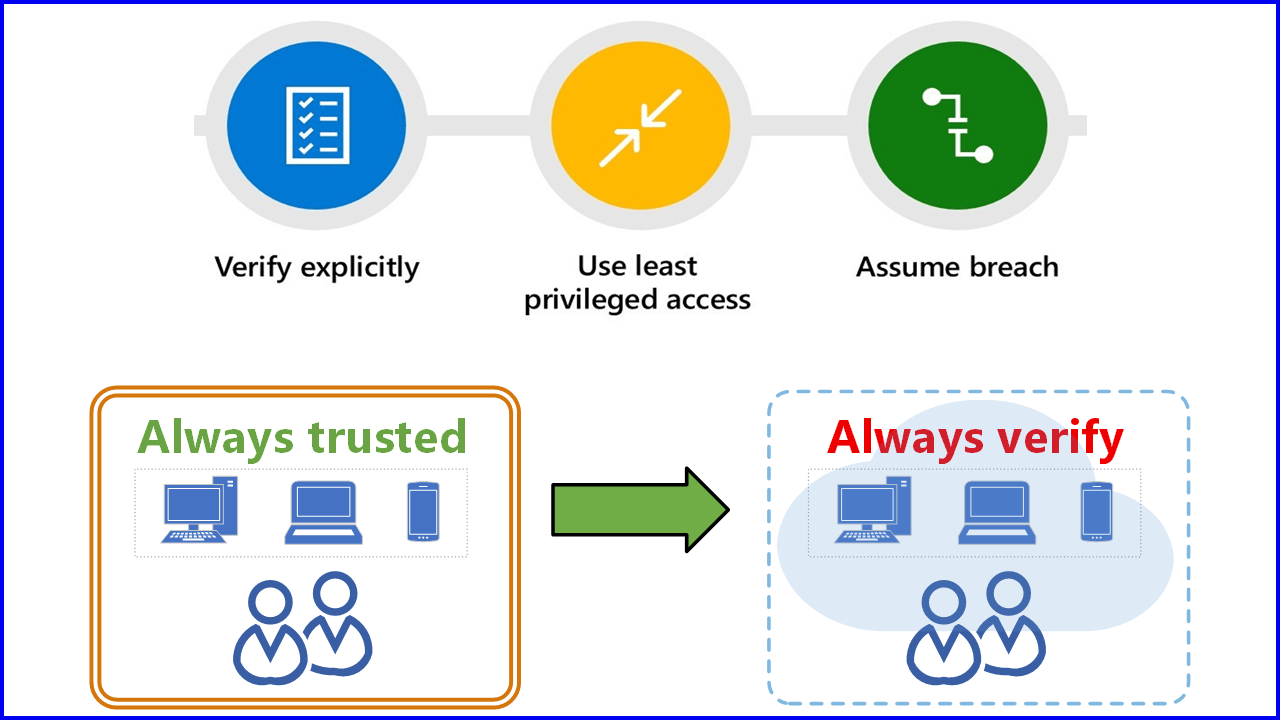
Never trust, always verify is the foundational mantra of the Zero Trust security model.Microsoft defines Zero Trust based on three core principles:
- Verify explicitly
Always authenticate regardless of location, identity, or device. - Use least privilege access
This means granting users, devices, and apps only the minimum permissions necessary to perform their tasks and only for the time required. - Assume breach
This means that your company is currently under attack or will be attacked in the future.
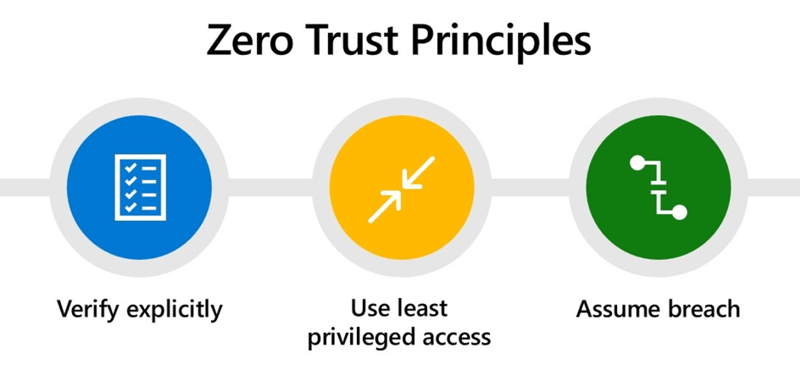
Image 1: Zero Trust Principles
Implementing Zero Trust is a complex task. We will cover this broad topic in multiple videos next time. Today we will discuss how to prepare for Zero Trust implementation in Microsoft 365.
Legacy Network vs. M365 Cloud-Only (Zero Trust)
The traditional on-premises network model was built around a simple assumption: everything inside the corporate network can be trusted. For many years, this perimeter-based approach worked reasonably well. Users were in the office, devices were managed, and applications lived localy.This approach assumes that internal users, devices, and networks are secure—an assumption that no longer holds true in today’s threat landscape.
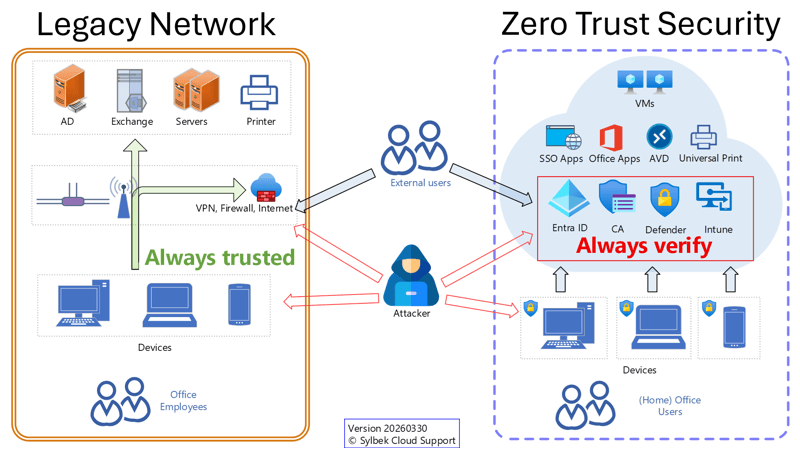
Image 2: Legacy network vs. Cloud-only (Zero Trust)
Is your Windows infrastructure similar to the legacy network shown on the left?
If so, it may be time to consider a cloud-first strategy with Windows 11 and Microsoft 365. The Zero Trust principles assume breach reminds us that attacks are not a future possibility, but an ongoing reality. In this context, relying on network location or VPN access alone raises an important question: Is your VPN always secure against vulnerabilities?
A cloud-only infrastructure based on Microsoft Entra ID provides strong security advantages and aligns closely with Zero Trust principles by design.
Hybrid AD to Entra ID
If you have too many dependencies in your Active Directory (AD), you should at least use a hybrid deployment to synchronize your identities and devices with Entra ID.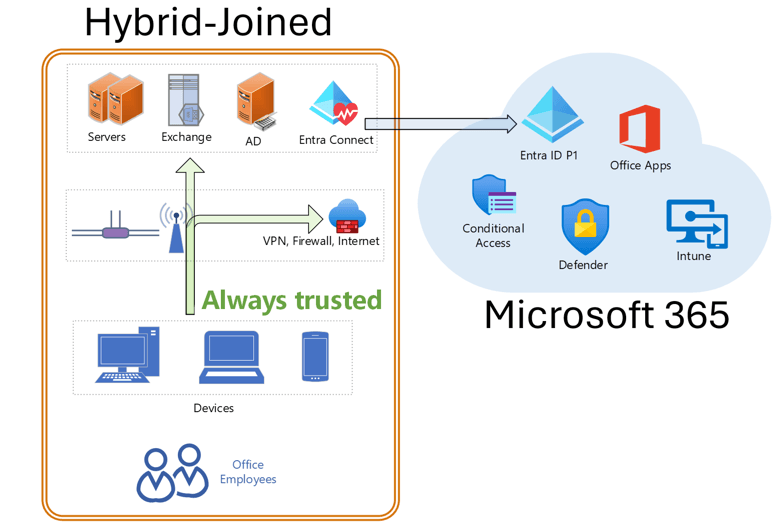
Image 3: Hybrid environment: Synchronization from AD to Entra ID
Compared to a cloud-only solution, a hybrid environment has significant security drawbacks. The three most important ones are:
- Hybrid devices store domain passwords
Hybrid joined devices cache active directory credentials such as NTLM hashes or Kerberos tickets which attackers can extract if they steal a device.
Entra joined devices use token-based authentication via a Primary Refresh Token (PRT), which is device-bound and protected by hardware-backed keys such as TPM. - Hybrid authentication bypasses Conditional Access
Domain logins and on-prem apps use Kerberos or NTLM, so Conditional Access cannot block or control them. Only cloud-based sign-ins can be fully protected. - Sync Server becomes a high-value target
Hybrid environments require components like Microsoft Entra Connect for synchronization. This increases the attack surface creating an additional high-value target that can affect both on-premises Active Directory and the cloud.
Conditional Access - main policy engine for Zero Trust
Conditional Access is the main policy engine required for implementing Zero Trust. It is included in Entra ID plan 1 which comes with Microsoft 365 Business Premium, Microsoft 365 E3 and E5.To protect admins, users, guests, devices, and cloud apps, it is important to implement or improve Conditional Access with our provided policies, to be found:
YouTube Video - Conclusion
- Never trust, always verify
To defend against today's sophisticated attacks, organizations must adopt a Zero Trust security model. - Cloud-only
Modernize your environment moving to a Microsoft 365 cloud-only model with Entra joined devices is one of the strongest steps toward Zero Trust by design. - Conditional Access
Implementing the right Conditional Access policies is the fastest and most effective way to immediately improve your security posture.
Watch the YouTube video to understand how to prepare your Microsoft 365 environment for Zero Trust
Thank you for contacting us about this topic and M365 in general.
Questions about M365, Azure, or Copilot?
☏ +49 721 66980 610
Write to us,
you can expect an answer on the same or next working day.
you can expect an answer on the same or next working day.
M365 & Azure expertise
✅ M365 License Delivery
✅ Security & Compliance Audit
✅ Reduce attack surface and complexity
✅ Azure Landing Page & Cost Optimization
Expert Support for M365 & Azure
Receive direct access to certified Microsoft security experts at fair and transparent rates (75 - 95 EUR/hour). We can use your ticket system or our support Jira ServiceDesk, see sample ticket.

 Copyright 2018 - 2026 Microsoft 365 Support
Your resolution: , time (de): 14:22:26