


M365 Email Encryption – TLS, MPME, S/MIME
In this YouTube video, we walk step-by-step through the full troubleshooting workflow for Microsoft 365 email encryption methods: TLS, MPME & S/MIME.
Author: bha created on 2026-03-05
Thank you
Why email encryption is important
Many emails are transmitted without encryption, meaning they travel across networks as plain text. In such cases, the message content can potentially be read by anyone who has access to the communication path between the sender and the recipient. This may include service provider personnel as well as individuals with access to the underlying network infrastructure or physical transmission medium.When it comes to email protection, email encryption plays a vital role in ensuring the security of your communications with customers.
At a minimum, every organization should use Transport Layer Security or TLS to secure email transport between mail servers.
The video demonstrates how to set up and enforce TLS encryption for incoming and outgoing emails.
Microsoft Purview Message Encryption (MPME)
To use MPME (formerly Office 365 Message Encryption (OME)) organizations need Azure Information Protection Plan 1, which is included in Microsoft 365 Business Premium, Office 365 E3/E5, and Microsoft 365 E3/E5.The video demonstrates the two main ways MPME can be configured: Enforcing Encryption for All Employees or Allowing Users to Choose Encryption.
Enforcing Encryption for All Employees
This is done by creating an Exchange Online mail flow rule that applies Office 365 Message Encryption whenever the sender is inside the organization.
Once this rule is active, all outgoing messages are delivered as encrypted messages to the recipient. In the video, you can clearly see how the same email appears as an encrypted message in both Outlook on the web and Outlook Classic.
Allowing Users to Choose Encryption
Before demonstrating this, the video disables the previously created mail flow rule—because with that rule active, every message would continue to be encrypted automatically.
After the rule is disabled, Outlook provides users with the familiar encryption toggle (represented by a lock symbol). When composing an email, users can simply choose the “Encrypt” option before sending.
The result for recipients is identical to the company-wide approach: messages arrive encrypted, and the demonstration shows how they look in both the new Outlook and Outlook Classic interfaces.
MPME - Troubleshoting
For tenants created before February 2018, Azure Rights Management should be enabled via PowerShell in two ways.
If Exchange Online Rule did not encrypt the email
# install
Install-Module -Name ExchangeOnlineManagement
# connect
Connect-ExchangeOnline
# check
Get-IRMConfiguration | select AzureRMSLicensingEnabled
# if False, set
Set-IRMConfiguration -AzureRMSLicensingEnabled $true
Install-Module -Name ExchangeOnlineManagement
# connect
Connect-ExchangeOnline
# check
Get-IRMConfiguration | select AzureRMSLicensingEnabled
# if False, set
Set-IRMConfiguration -AzureRMSLicensingEnabled $true
If user selection did not encrypt the email
# install
Install-Module -Name AIPService
# connect
Connect-AipService
# check
Get-AipService
# if Disabled, set
Enable-AipService
Install-Module -Name AIPService
# connect
Connect-AipService
# check
Get-AipService
# if Disabled, set
Enable-AipService
Email encryption with S/MIME certificate
Email encryption with S/MIME is another powerful method for securing email communication in Microsoft 365.For the demonstration, a self-signed certificate is used. For external communication, you should purchase and use a trusted certificate.
A self-signed S/MIME certificate must be installed as a trusted root certificate on all devices—desktops, laptops, and smartphones.
The video walks through the configuration process in Outlook Classic. After generating the PFX certificate, it is imported into Outlook along with the private key. During the setup, the hash algorithm is changed from the insecure SHA1 to SHA256, ensuring that all signed emails meet modern security standards.
Once the certificate is available, it is published to the Global Address List (GAL). This allows colleagues to automatically retrieve the public key of the user, enabling them to send encrypted emails back.
═══
═══
The video then switches to the user experience. An example email from Ben shows how S/MIME looks in practice. Two icons in the message header indicate that the email is both signed and encrypted. When replying to such an email, the signing and encryption options in Outlook are automatically pre-selected. This happens because the original message was protected with S/MIME, and Outlook assumes the same level of protection should be applied to the reply.Email encryption comparison
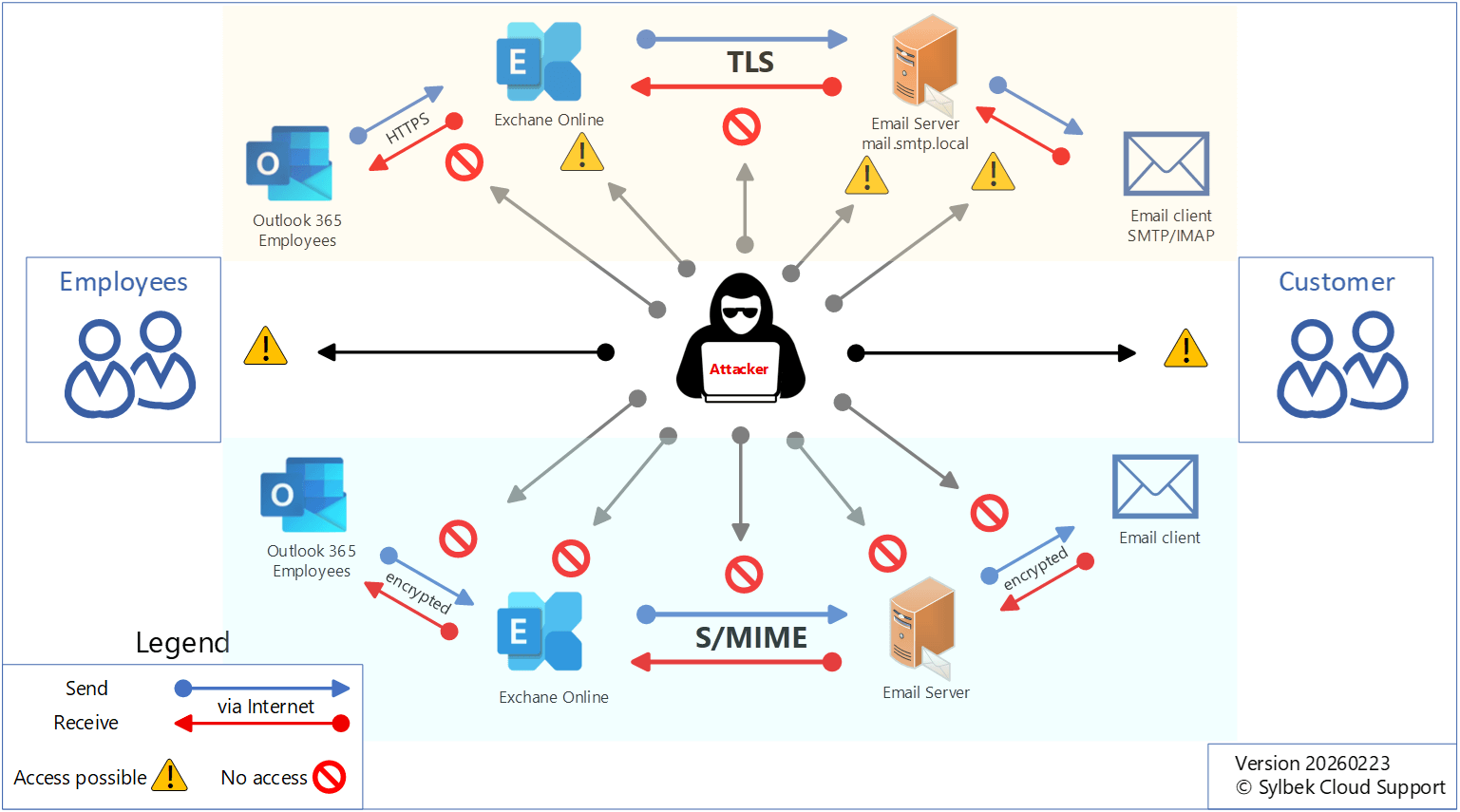
If you're unsure which encryption method fits your business, comparing them from an attacker’s viewpoint helps highlight the differences.TLS is simple to deploy and protects only the transport path between mail servers or between client and server. Once the email reaches the recipient’s server, protection ends.
If users (customer site) access their mailbox through insecure protocols like unencrypted IMAP or SMTP, the message can still be exposed. TLS improves security but does not protect the email itself.
S/MIME offers true end-to-end encryption. Emails remain protected even if servers or networks are compromised, since decryption happens only on the user’s device. However, it requires purchasing, deploying, and renewing personal certificates for every employee, which increases cost and administrative effort.
MPME is ideal for organizations using Exchange Online or hybrid setups. It provides strong message-level encryption without certificate management and is included in Microsoft 365 Business Premium and E3/E5 plans. Users or admins can apply encryption easily through mail flow rules.
Because Microsoft manages the keys, decryption is technically possible, but this model significantly reduces operational overhead.
User device
However, the main risk always remains with the user. If an attacker gains access to a user's device, for example, through phishing or malware, they could intercept emails before encryption or after decryption. This risk exists regardless of the encryption technology.
Take a look at the two images below to see the differences between TLS, MPME, and S/MIME. Click the buttons below to change the images.
Which Encryption Method you choose depends on your organization's compliance requirements and in some cases on your customers expectations.
At a minimum, every organization should use transport layer security or TLS to secure email transport between mail servers.
For internal communication and for communicating with customers who also use Exchange Online, the video recommends using Microsoft Purview Message Encryption (MPME) together with Exchange Online mail flow rules. This approach provides strong protection while keeping the process simple for your users.
For employees who work with sensitive or business critical information, S/MIME still offers the highest level of end-to-end protection. Just remember that your communication partners also need a trusted S/MIME certificate for it to work properly.
And one final thought, more than 90% of cyber attacks start with an email. That's why securing your email communication is absolutely essential. Take a look at our email protection blog and video: Email Protection with Exchange Online.
Thank you for contacting us about this topic and M365 in general.
Questions about M365, Azure, or Copilot?
☏ +49 721 66980 610
Write to us,
you can expect an answer on the same or next working day.
you can expect an answer on the same or next working day.
M365 & Azure expertise
✅ M365 License Delivery
✅ Security & Compliance Audit
✅ Reduce attack surface and complexity
✅ Azure Landing Page & Cost Optimization
Expert Support for M365 & Azure
Receive direct access to certified Microsoft security experts at fair and transparent rates (75 - 95 EUR/hour). We can use your ticket system or our support Jira ServiceDesk, see sample ticket.

 Copyright 2018 - 2026 Microsoft 365 Support
Your resolution: , time (de): 02:42:19