


Email Protection with Exchange Online
In this YouTube video, we walk through the exact configuration used to secure medium and large-sized companies using Exchange Online and Microsoft Defender for Office 365.
Author: bha created on 2026-03-04
Thank you
importannce of Email protection
Email remains the primary entry point for cyberattacks against businesses. Around 90% of attacks begin in the inbox, making email security one of the most critical aspects of IT protection. However, the threat landscape has evolved significantly. Traditional phishing emails are no longer the biggest concern. Instead, attackers are increasingly relying on Phishing-as-a-Service (PhaaS) platforms.These platforms operate much like legitimate software services. Criminals can purchase ready-made phishing kits that include fake login pages, prebuilt email templates, and even technical support. This significantly lowers the barrier to entry, allowing attackers with little technical expertise to launch sophisticated campaigns.
According to the European Union Agency for Cybersecurity (ENISA), phishing remains the primary method for initial compromise, accounting for roughly 60% of observed incidents. Modern phishing operations are highly industrialized, with platforms such as Darcula phishing platform enabling large-scale campaigns that impersonate hundreds of organizations.
These services do not only target large enterprises. Small and midsized companies are increasingly affected, as automated phishing campaigns can be launched at massive scale and are often capable of bypassing traditional security controls. For this reason, modern email protection solutions—such as those provided by Exchange Online—play a crucial role in defending organizations against today’s evolving threats
Email Basic Security (MX, SPF, DKIM, DMARC)
Secure email delivery requires several essential DNS configurations: MX, SPF, DKIM, and DMARC. These records ensure that emails are forwarded correctly and that messages sent from your domain can be verified by the receiving email systems and delivered to the recipient.All Microsoft 365 plans include Exchange Online Protection. Advanced protection features are available with Microsoft Defender for Office 365 Plan 1, included in Microsoft 365 Business Premium, Microsoft 365 E3, and E5. The MX record should point to Exchange Online so that all incoming email is processed by Microsoft's security systems.
The video shows you how to find and export your DNS settings. The image below shows the correct setting for the subdomain learn.m365.de.
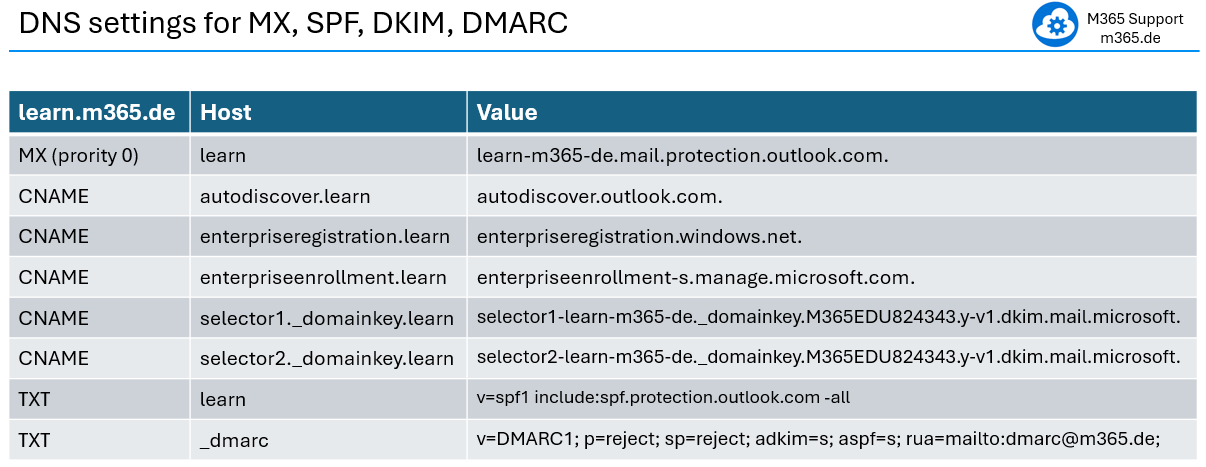
The DMARC entry is not found in the export. However, it is important. So, It will be shown here. You can use this strict DMARC entry for domains and subdomains. Of course, change the RUA entry to your email address or remove it entirely as it is not needed. Optionally, enter your email address there to receive reports from other email providers in the event of any suspicious activity involving your domain.
DNS changes may take several hours to propagate worldwide, so MX record updates should ideally be performed outside business hours.
Quarantine and threat policies
In the video will be domonstrated how to create two quarantine policies.The first policy allows users to release quarantined emails themselves. These messages are typically spam sent in large volumes and often contain advertising or low-risk fraudulent content.
The second policy is designed for emails that users can only request to release. These messages usually pose a higher risk—for example, emails that appear to come from a trusted source but are actually phishing attempts aimed at stealing sensitive information such as passwords or credit card details.
The quarantine policies are created first. Later, within the threat policy settings, emails are directed to the appropriate quarantine—user release, request release, or the administrator quarantine—depending on the detected threat level.
The video will demonstrate step-by-step how to create and configure five email protection policies: Anti-Phishing, Anti-Spam, Anti-Malware, Safe Attachments, and Safe Links (see the screenshot below).
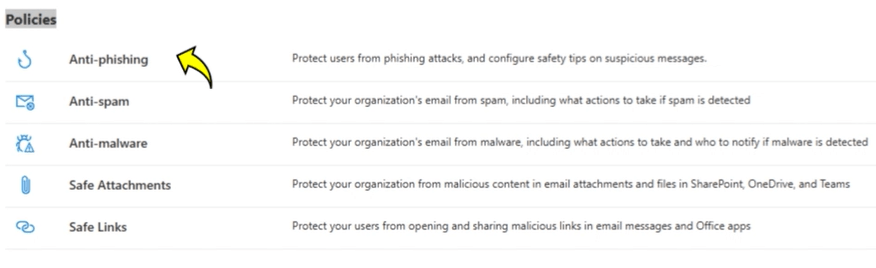
This practical configuration has proven effective in protecting the emails of thousands of users in medium and large companies. You may want to start with a group of users or a specific domain and customize it further according to your needs.
User quarantine and user guide
This blog format cannot display the 7 configuration guidelines with explanations, so please follow the video.After setting the quarantine and threat policies, the user receives quarantine emails, similar to the screenshot.
═══
═══
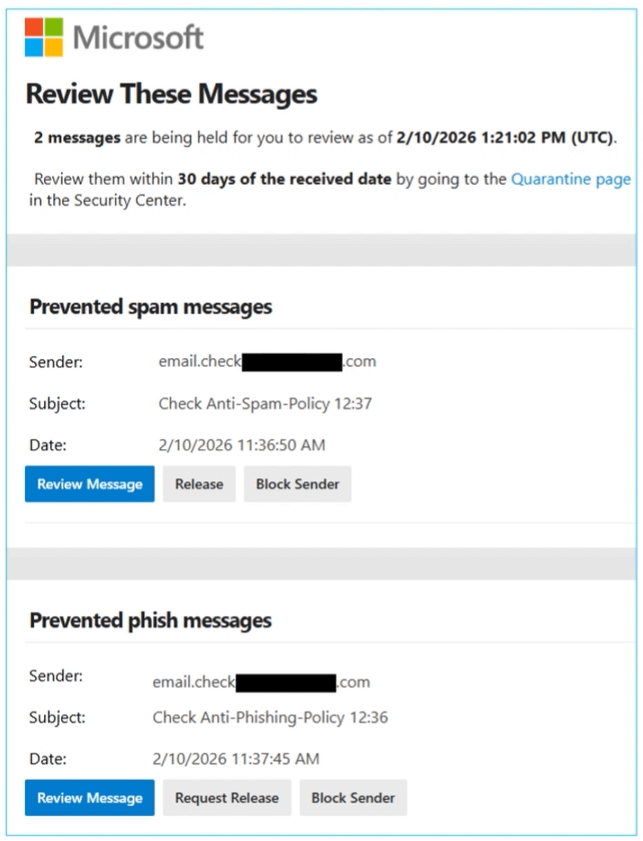
In the video, we cover user quarantine and the user guide below. We can display the guide here as text so that you can easily use it (as a draft) to inform users.
Please inform users before or immediately after setting up the policies.
Qarantine - User release
When such an email arrives, the system checks whether it is threatening. These are mostly spam emails, which are often sent in large quantities and usually contain advertising or fraudulent content.
If such email is recognised as spam, it is not delivered to the recipient. Instead, the recipient receives a quarantine email that include the sender and subject. Based on this information you could decide to:
- review message
- release email
- delete quarantine email
- block the sender (effects future emails)
Qarantine - User request release
There are Emails that are dengerous as are phishing emails, that look like they come from trustworthy sources but are actually aimed at stealing sensitive information such as passwords or credit card details.
If such email is recognised as phishing, it is not delivered to the recipient. Instead, the recipient receives a quarantine email that include the sender and subject. Based on this information you could decide to:
- review message
- request release
- delete quarantine email
- block the sender (effects future emails)
Email enrcryption and conclusion
Many emails are transmitted without encryption, meaning they travel across networks as plain text. In such cases, the message content can potentially be read by anyone who has access to the communication path between the sender and the recipient. This may include service provider personnel as well as individuals with access to the underlying network infrastructure or physical transmission medium.When it comes to email protection, email encryption plays a vital role in ensuring the security of your communications with customers.
In the video, we talked about:
- TLS - encrypts emails during transmission
- S/MIME Standard for email signatures and encryption in most platforms
- MPME Microsoft Standard - Tenant-to-Tenant email encryption
- Other Email Encryption PGP, E2EE, Portal-Based
The video covers email encryption methods in general. Since this is a very big topic, we have created a separate video with step-by-step configuration: M365 Email Encryption.
The video ends with the following key message:
Email is one of the primary targets for cyberattacks, making it essential to implement robust protection measures. With the configurations we have presented, you can achieve a substantial reduction in risk. The objective is not to achieve 100% security, but rather to continuously reduce risk and predict new attack methods.
Thank you for contacting us about this topic and M365 in general.
Questions about M365, Azure, or Copilot?
☏ +49 721 66980 610
Write to us,
you can expect an answer on the same or next working day.
you can expect an answer on the same or next working day.
M365 & Azure expertise
✅ M365 License Delivery
✅ Security & Compliance Audit
✅ Reduce attack surface and complexity
✅ Azure Landing Page & Cost Optimization
Expert Support for M365 & Azure
Receive direct access to certified Microsoft security experts at fair and transparent rates (75 - 95 EUR/hour). We can use your ticket system or our support Jira ServiceDesk, see sample ticket.

 Copyright 2018 - 2026 Microsoft 365 Support
Your resolution: , time (de): 19:09:10