


Modern Workplace with Microsoft 365, Copilot, and Azure
Modern workplace solutions with Microsoft 365, Teams, Intune, Copilot, Azure, and Microsoft 365 Backup to support secure hybrid work.
A modern workplace combines secure access, collaboration, device management, cybersecurity, backup, and business applications into a unified cloud platform. Microsoft 365 and Azure provide the foundation for flexible work, while Copilot helps employees work more efficiently with AI-assisted support.Updated on: 2026-11-03
Hybrid Work with Secure Access
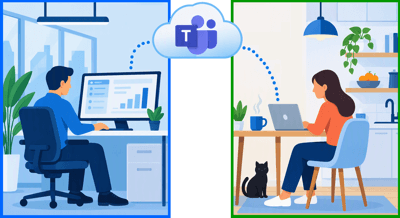
Employees often work from different locations. Some work in the office every day, while others work partly from home or travel frequently.Microsoft 365 allows users to access company resources securely from different devices and locations. Identity management, cloud services, and modern security features help IT teams support flexible working without increasing complexity.
We can support with:
- Hybrid work strategy
- Secure remote access
- Microsoft Entra ID integration
- Multi-Factor Authentication (MFA)
- Conditional Access policies
- Device enrollment and onboarding
Collaboration with Microsoft Teams
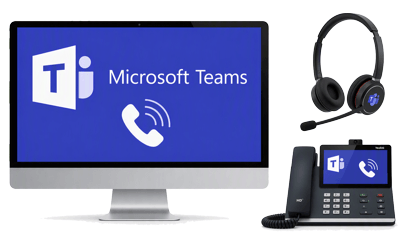
Microsoft Teams combines chat, meetings, file sharing, calling, and collaboration in one place.Teams can become the central workspace for departments, projects, and daily communication. Employees can exchange information quickly, work together on documents, and hold online meetings without switching between multiple tools.
We can support with:
- Teams deployment
- Team and channel design
- Teams Phone implementation
- Meeting room integration
- Guest and external collaboration
- User adoption and training
Desk Sharing with Microsoft Places
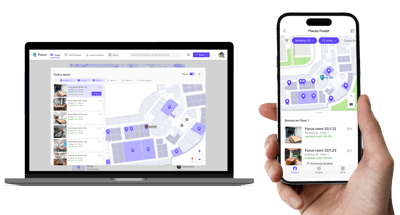
Many organizations no longer assign a permanent desk to every employee. Users may work remotely several days per week and only come into the office when needed.Microsoft Places helps employees reserve desks, coordinate office days with colleagues, and find available workspaces.
We can support with:
- Desk sharing concepts
- Microsoft Places deployment
- Workspace booking configuration
- Meeting room management
- Office attendance planning
- Hybrid workplace optimization
Device Management with Intune
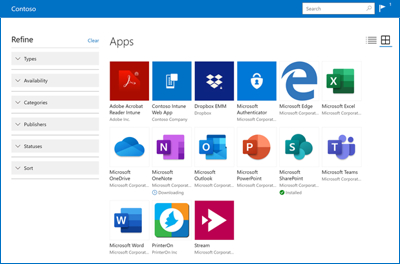
Managing laptops, smartphones, and tablets becomes more difficult as companies grow.Microsoft Intune allows IT teams to manage Windows, macOS, iOS, and Android devices from a central platform. Devices can be configured, applications deployed, and security policies enforced without manual work on each device.
With Intune and Windows Autopilot Administrators can configure and deploy devices remotely without them ever touching the corporate office.
We can support with:
- Intune enrollment concept
- Intune implementation
- Windows Autopilot deployment
- Mobile device management
- Security policy configuration
- Compliance monitoring
- Endpoint lifecycle management
Endpoint Security with Defender for Endpoint
Endpoints are one of the most common entry points for cyber attacks. A modern workplace therefore requires more than traditional antivirus software.Microsoft Defender for Endpoint helps detect and respond to threats such as ransomware, malware, suspicious activities, and compromised devices.
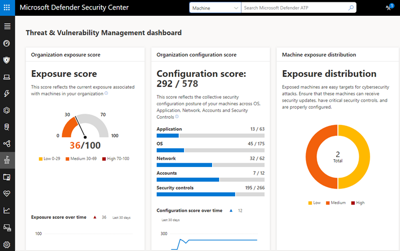
We can support with:
- Defender deployment
- Security baseline implementation
- Attack Surface Reduction (ASR)
- Endpoint security monitoring
- Security incident response
- Defender optimization reviews
M365 Copilot Readiness and Deployment
Many organizations are interested in Microsoft 365 Copilot but are unsure how to prepare their environment.Before introducing Copilot, companies should review permissions, data access. It is essential that the implementation of Microsoft Purview is completed before Copilot enrollment. Microsoft Purview helps organizations classify, protect, and govern business data across Microsoft 365.
Existing SharePoint, Teams, and OneDrive data should also be assessed.
We can support with:
- Copilot enrollment concept
- Copilot readiness assessments
- Tenant reviews
- Permission analysis
- Purview integration
- Pilot deployments
- User adoption support
Azure Virtual Desktop (AVD)
Many organizations deploy Azure Virtual Desktop (AVD) to centrally manage applications and remote work environments. AVD is exclusively available as Windows 11 Enterprise on Azure, supporting multiple concurrent users on a single virtual machine (VM) and lowering compute costs.Users can connect to AVD from anywhere and on any device that can use a browser. This includes: Windows, MacOS, ChromeOS, iOS, Android and Linux.

We can support with:
- AVD architecture design
- Multi-session environments
- Application publishing
- Secure remote workplaces
- Cost optimization
- Ongoing AVD management
Microsoft 365 Backup Storage & Recovery
Microsoft 365 provides built-in retention and recycle bin capabilities, but many organisations require additional backup and recovery options for Exchange Online, OneDrive, SharePoint, and Microsoft Teams data.Dedicated Microsoft 365 backup solutions help protect against accidental deletion, ransomware attacks, retention policy changes, and long-term recovery requirements. Regular backup verification and documented recovery procedures help reduce operational risk.
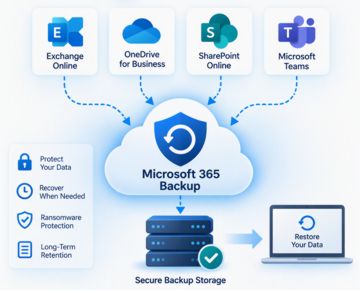
We can support with:
- Microsoft 365 backup assessments
- Exchange Online mailbox backup
- OneDrive backup and recovery
- SharePoint Online backup
- Microsoft Teams backup
- Backup retention planning
- Ransomware recovery scenarios
- Recovery testing and reporting
Additional Microsoft 365 Services
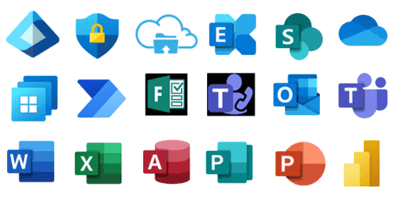
Many Microsoft 365 licences also offer a range of additional services for modern workplaces and efficient working.Microsoft Entra ID authenticates users whenever they use any Microsoft 365 services or apps, such as Outlook 365 or Word 365.
We can support with:
- Microsoft 365 Service Deployment Planning
- Exchange Online migrations
- SharePoint implementation
- OneDrive deployment
- Teams Phone systems
- Teams Rooms deployment
- Power Platform solutions
- Windows 365 Cloud PC
Licensing, Implementation and Support
A Microsoft 365 environment consists of more than licenses. Successful operation also requires planning, deployment, administration, and ongoing support.We offer the expertise and support you need to make your workplace safe, productive, and future-ready. Whether you’re implementing Microsoft 365 for the first time or modernizing an existing environment, you can count on us.
We provide:
- Microsoft 365 consulting
- Microsoft 365 License Management
- Migration and deployment projects
- Workplace hardware solutions
- Security reviews and hardening
- Managed services
- User support and administration
- Strategic Microsoft 365 consulting
Any Questions?
☏ +49 721 66980 610
Write to us,
you can expect an answer on the same or next working day.
you can expect an answer on the same or next working day.
Consulting, Support & Security
✅ M365 & Azure Cloud Migrations
✅ Tenant Security Audits & Reviews
✅ Managed Services & Workplace Hardware
✅ IT Modernization & Flat-Rate Support
Microsoft 365 Licenses
✅ Over 20 Years of IT Experience & Microsoft Partner
✅ License Optimization & Consulting
✅ Fast License Provisioning for Business Customers
✅ Payment by Invoice for Business Customers
 Copyright 2018 - 2026 M365 Support
Your resolution: , time (de): 15:44:22