


Standard Hardware for a Modern Workplace
Standardised hardware simplifies support, improves security, and reduces long-term operating costs.
We provide a carefully selected range of workplace hardware designed for Microsoft 365, Teams, Intune, and Entra ID.
Updated on: 2026-11-03
Chromebook, Laptop with Google ChromeOS
For employees who mainly work in web applications, Microsoft 365, Teams, AVD, and cloud services, a Chromebook can be a simple and cost-effective solution.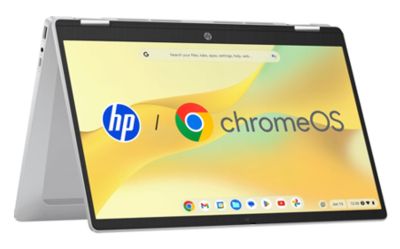
Hardware Properties and Sevice:
- HP Chromebook x360 Laptop
- Robust and silent operation, 360° convertible touchscreen design
- Long battery life, up to 12 hours
- In the event of a hardware failure, we can provide a preconfigured replacement device from stock and ship it within the EU.
- HD webcam, microphone and speaker for the proper meeting experience
- Intel N100 CPU, 4GB RAM, 128GB Storage, 14" Touch screen (1366x768)
- 2 USB-C ports for monitors and charging (use any USB-C fast charger)
- More information: Technical Specification, User Guide
Windows 11 Business Notebook
Windows 11 Pro remains the standard business platform for employees who require desktop applications, local software, multiple peripherals, or advanced productivity tools.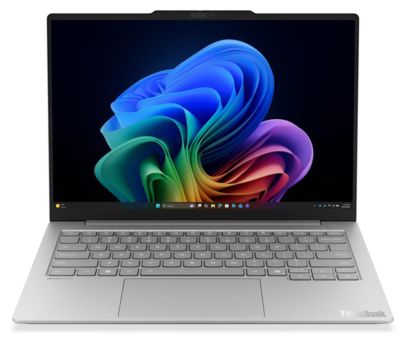
Hardware Properties and Service:
- Lenovo ThinkBook with Windows 11 Pro
- Super lightweight (less than 1 kg) metal housing, fast with MoP Memory
- Lenovo 3-year warranty, Premier Support (onsite, next working day)
- Full compatibility with Microsoft 365 apps, Entra ID and Intune
- Windows Hello passwordless sign-in, fingerprint and facial recognition
- FHD webcam, microphone and speaker for the proper meeting experience
- Intel 226V CPU, 16GB RAM, 512GB Storage, 14" IPS screen (1920x1200)
- 1 HDMI and 2 USB-C ports, use any USB-C charger with 45-65W
- More information: Technical Specification, User Guide
miniPC Desktop Solution
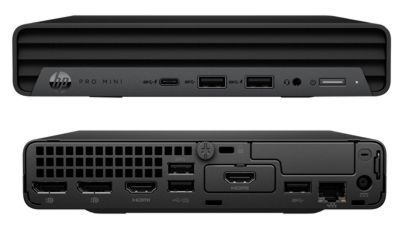
For some businesses, a mini-PC could be an alternative to notebooks or laptops. It offers better value for the money thanks to its durability, its upgradeability, and the fact that it doesn't have a battery that can wear out.Measurements show such a MiniPC with an external power supply consumes less power for the same performance. There is no power loss due to battery charging.
Hardware Properties and Service:
- HP MiniPC with Windows 11 Pro
- It can be connected to 3 monitors (option for 4 monitors)
- HP 3-year warranty with next business day onsite support
- Full compatibility with Microsoft 365 apps, Entra ID and Intune
- Intel Core i5-14400T CPU, 16GB RAM, 512GB Storage
- 2 Display + 1 HDMI ports to connect 3 monitors
- More information: Technical Specification, User Guide
https://www.hp.com/ie-en/products/laptops/product-details/2102294568
Meeting Room Solutions
Meeting room technology should be simple to use and easy to manage. Microsoft Teams Rooms systems provide a consistent meeting experience for both remote and in-office participants. Join meetings with a single touch and benefit from high-quality audio, video, and content sharing.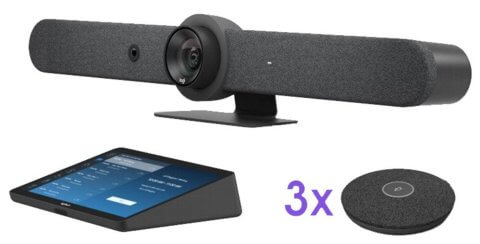
Conference room solution with Logitech devices:
- Android computer with integrated speaker and camera with 5x optical zoom
- Connect 2 displays via HDMI and up to 3 Logitech microphones
- Controlled via Android tablet
- Management via Microsoft Teams admin center
- Presentation possible via HDMI+USB cable
- Logitech 5 years warranty
Cloud Printing with Microsoft Universal Print
Traditional print servers create administration effort and require ongoing maintenance.Microsoft Universal Print allows printers to be managed through Microsoft 365 without a local print server. Ideal for organisations that want to reduce local infrastructure and support costs.
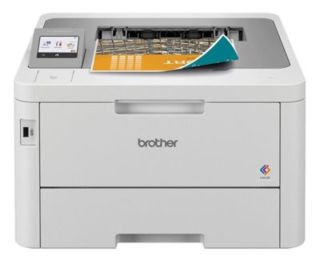
Hardware Properties and Service:
- BROTHER color laser printer
- Cloud-based printer management, M365 Universal Print
- Central administration
- Simplified deployment for remote users
- More information
Hardware delivery, installation, and support
Many organizations struggle with hardware procurement, deployment, device replacements, and lifecycle management. Different device types, changing user requirements, and limited IT resources often increase complexity and support costs.We provide standardised hardware solutions that are ready for Microsoft 365. Devices can be delivered preconfigured, enrolled in Microsoft Intune, and prepared for immediate use in your Microsoft 365 tenant.
Hardware Services Included with Our MSP Support Packages:
- Hardware selection based on your business requirements
- Delivery directly to the employee or office location
- Windows Autopilot and Microsoft Intune preconfiguration
- Chromebook enrollment and Microsoft 365 configuration
- Device replacement and warranty handling
- Support for workplace moves, onboarding, and offboarding
- Single point of contact for hardware and Microsoft 365 services
Not Sure Which Devices Fit Your Organisation?
Whether you prefer Chromebooks, Windows laptops, conference room systems, or cloud-managed printing, we can help define a standard workplace platform that matches your requirements and budget.
Contact us for a short consultation and a personalised recommendation for your workplace hardware and Microsoft 365 environment.
Any Questions?
☏ +49 721 66980 610
Write to us,
you can expect an answer on the same or next working day.
you can expect an answer on the same or next working day.
Consulting, Support & Security
✅ M365 & Azure Cloud Migrations
✅ Tenant Security Audits & Reviews
✅ Managed Services & Workplace Hardware
✅ IT Modernization & Flat-Rate Support
Microsoft 365 Licenses
✅ Over 20 Years of IT Experience & Microsoft Partner
✅ License Optimization & Consulting
✅ Fast License Provisioning for Business Customers
✅ Payment by Invoice for Business Customers
 Copyright 2018 - 2026 M365 Support
Your resolution: , time (de): 15:45:31