


M365 Copilot, Copilot Cowork, Copilot Studio & AI Agents, Azure AI
Learn more about the differences between Microsoft Copilot Chat, M365 Copilot & Cowork, Copilot Studio & AI agents, and Azure AI Foundry, and how they work together.
Author: bha created on 2026-08-26
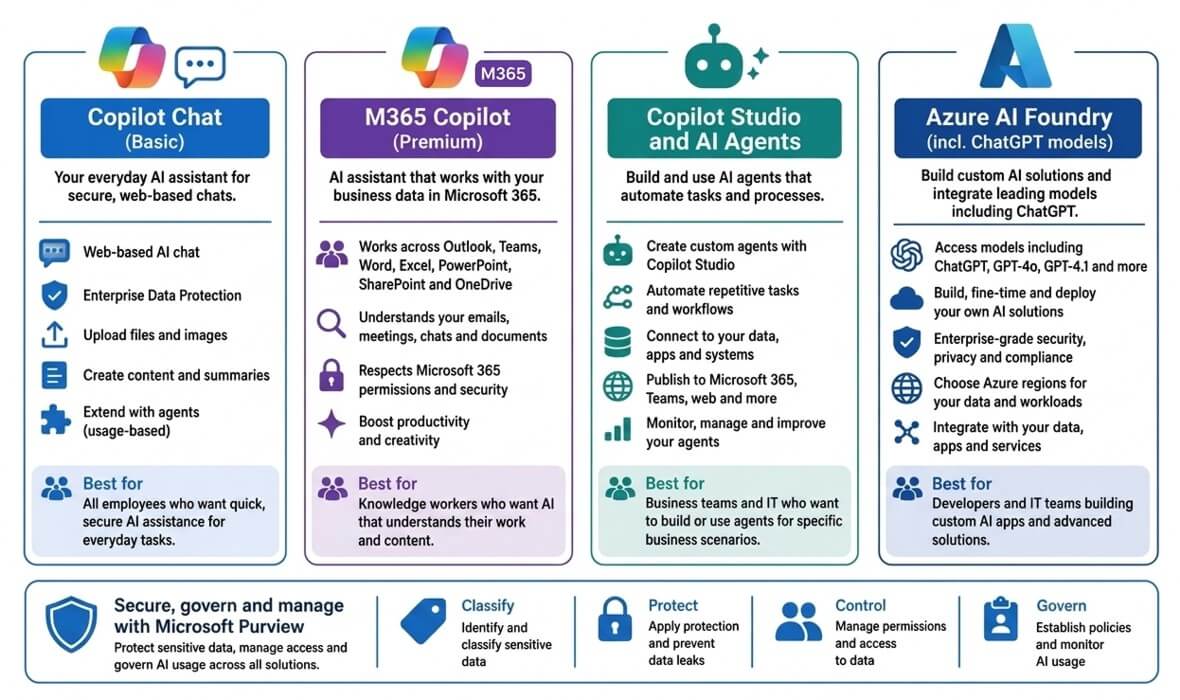
Drawing: Sybek (2026)
What is Microsoft Copilot?
Microsoft Copilot is a family of AI-powered products designed for business and enterprise users. At the time of writing Microsoft Copilot includes:- Productivity: Copilot Chat, Microsoft 365 Copilot, Copilot Cowork, Copilot Studio & AI agents
- Role-Specific: Security Copilot, Dynamics 365 Copilot, Copilot for Sales/Service/Finance
- Developers: Azure AI Foundry, GitHub Copilot, Power Platform Copilot
In this article, we focus on Copilot products that customers are most likely to evaluate and use:
- Copilot Chat
- Microsoft 365 Copilot
- Copilot Cowork
- Copilot Studio & AI Agents
- Azure AI Foundry & ChatGPT
- Microsoft Purview - Copilot preparation
Microsoft Copilot Chat
Copilot Chat allows users to ask questions, summarize documents they upload, generate content, and perform web-based research. Copilot Chat is available in all Microsoft 365 Business and Enterptise plans.Microsoft uses enterprise data protection for prompts and responses in Copilot Chat, the same protection that is used in other commercial copilot offerings.
Copilot Chat not have access and not use a user's emails, Teams chats, meetings, or Microsoft 365 documents as a knowledge source.
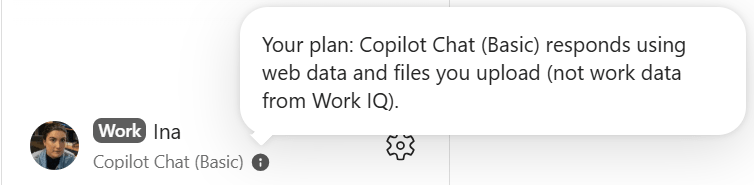
To see which license of Copilot you have, see the botton left corner. You should see there as: Copilot Chat (Basic). If your company e.g. have enrolled the payed license of Copilot Cowork (see below) to some other users, you may see M365 Copilot (Basic) instead.
Microsoft 365 Copilot
Microsoft 365 Copilot builds on Copilot Chat and can use business information stored in Microsoft 365, in: Outlook emails and calendar, Teams chats and meetings, OneDrive/SharePoint files.We offer the following Microsoft 365 Copilot licences:
- Microsoft 365 Copilot - for all organisations
- Microsoft 365 Copilot Business - till 300 licenses
- Microsoft 365 Copilot (Nonprofit)
- Microsoft Copilot for Microsoft 365 A3 and A5 (Education)
- Microsoft Copilot Studio
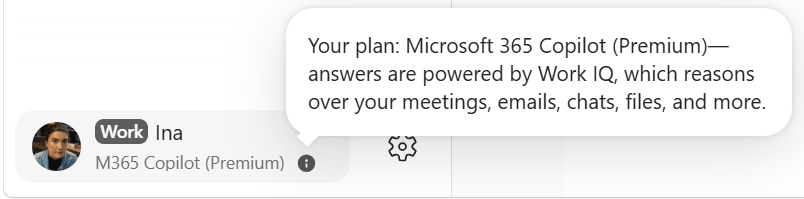
When the license of Microsoft 365 Copilot is assigned to the user, after a while the user will find on the bottom left corner M365 Copilot (Premium) as seen on the screenshot.
Copilot Cowork
Microsoft Copilot Cowork is an agent-based system that allows you to delegate multi-step projects and tasks across your apps, files, and data rather than just chatting or getting suggestions.At the time of writing, there is no separate Copilot Cowork license that can be purchased. Instead, users need a Microsoft 365 Copilot licence, and an Azure subscription must be attached for usage. To estimate the usage cost, see: Microsoft Copilot Credits Guide.
The core difference is that Microsoft 365 Copilot helps you think and write, while Cowork actually executes the entire multi-step project on your behalf.
See below for an overview of what Copilot Cowork can do that Microsoft 365 Copilot cannot.
- Works on your behalf: Copilot Cowork can complete tasks through AI agents, not just answer questions
- Automates business processes: It can collect information, create reports, update records, and trigger follow-up actions automatically
- Connects multiple systems: Agents can work across Microsoft 365 and other business applications without constant user involvement
- Runs repeatedly: Tasks can be executed whenever needed instead of requiring a user to start each step manually
- Reduces routine work: Employees spend less time on repetitive activities and can focus on higher-value tasks
Copilot Studio & AI Agents
Microsoft Copilot Studio is the toolkit used to create and customize AI agents.Copilot Studio allows organizations to design agents that match their own business processes, data sources, and requirements.
Organizations can create simple assistants or advanced autonomous agents that work across Microsoft 365 and external systems.
- Create custom AI agents: Build agents tailored to specific departments, teams, or business processes
- Connect business systems: Integrate agents with Microsoft 365, CRM, ERP, databases, websites, and other applications
- Control behavior: Define how agents respond, which actions they can perform, and which data they can access
- Automate workflows: Create agents that can handle approvals, service requests, customer interactions, and routine tasks
- Meet compliance requirements: Apply governance, security, and permissions that match organizational policies
- Scale across the business: Reuse and deploy agents for different departments without rebuilding them from scratch
Copilot Studio becomes even more powerful when combined with the Microsoft Power Platform. AI agents can use Power Automate flows to perform actions automatically, such as creating approvals, updating records, sending notifications, generating documents, or synchronizing information between different systems.
In practice, the AI agent acts as the 'brain' that understands requests and makes decisions, while Power Automate carries out the actual business processes behind the scenes.
Azure AI Foundry & ChatGPT
Azure AI Foundry is designed for organizations that want to create custom AI applications, assistants, and automation solutions using leading AI models such as ChatGPT. It provides access to leading AI models, including OpenAI models such as ChatGPT, and allows businesses to combine these models with their own data, applications, and business processes.Organizations can develop custom AI assistants, intelligent applications, and advanced automation scenarios tailored to their specific requirements.
Key capabilities of Azure AI Foundry::
- Access leading AI models, including ChatGPT, GPT-4o, GPT-4.1, and future Azure-hosted models
- Build custom AI solutions for unique business requirements
- Integrate company data with AI applications and services
- Choose Azure regions for data processing and compliance needs
- Develop advanced AI applications beyond Microsoft 365 scenarios
- Scale and manage AI projects across the organization
In simple terms, Copilot helps employees work more effectively, while Azure AI Foundry helps organizations create entirely new AI-powered products, applications, and business solutions.
Microsoft Purview - Copilot preparation
Microsoft Purview is not an AI tool itself. Instead, it helps organizations prepare their data, security, and compliance environment before introducing Microsoft Copilot, AI agents, or custom AI solutions.AI systems generally respect the same permissions that users already have within Microsoft 365. This makes it important to understand where sensitive information is stored, who can access it, and whether confidential data is adequately protected before enabling AI technologies across the organization.
Microsoft Purview helps organizations identify, classify, and protect sensitive information such as financial records, customer data, contracts, employee information, and intellectual property. It can apply labels, encryption, and access controls to ensure that important information remains protected.
Purview also helps organizations manage permissions, reduce oversharing, prevent accidental data leaks, and establish governance policies for AI usage. As businesses expand from Copilot Chat to Microsoft 365 Copilot, Copilot Studio, AI agents, or Azure AI Foundry, Purview provides a common security and compliance foundation across all of these solutions.
In simple terms, Copilot helps employees work with data, while Microsoft Purview helps ensure the right people can access the right data in a secure and compliant manner.
Key capabilities of Microsoft Purview:
- Classify sensitive data across Microsoft 365 and connected systems
- Protect confidential information with labels, encryption, and policies
- Control access and permissions to reduce oversharing risks
- Prevent data leaks through monitoring and policy enforcement
- Govern AI usage with security, compliance, and auditing controls
- Prepare data for Copilot by improving visibility and reducing security risks
Questions about M365, Azure, or Copilot?
☏ +49 721 66980 610
Write to us,
you can expect an answer on the same or next working day.
you can expect an answer on the same or next working day.
M365 & Azure expertise
✅ M365 License Delivery
✅ Security & Compliance Audit
✅ Reduce attack surface and complexity
✅ Azure Landing Page & Cost Optimization
Expert Support for M365 & Azure
Receive direct access to certified Microsoft security experts at fair and transparent rates (75 - 95 EUR/hour). We can use your ticket system or our support Jira ServiceDesk, see sample ticket.

 Copyright 2018 - 2026 Microsoft 365 Support
Your resolution: , time (de): 00:17:26