
Windows 365 Cloud PC
Access your personal Windows Cloud PC from almost any device while keeping applications, settings, and company data centrally managed, secured, and backed by Microsoft`s cloud infrastructure.
Windows 365 Cloud PCs can be accessed from Windows, macOS, Chromebook, Linux, iPad, Android, or a web browser.
Updated on: 2026-11-11
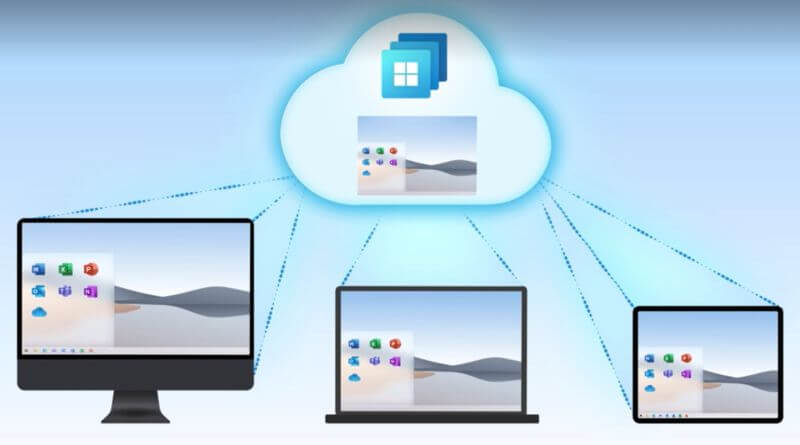
Created in 2026 using Copilot
What is Windows 365 Cloud PC?
Windows 365 Cloud PC is Microsoft`s cloud-based PC service.Each user receives a dedicated Windows desktop in Microsoft Azure that can be accessed from Windows, macOS, Chromebook, Linux, iPad, Android, or a web browser.
A Windows 365 Cloud PC includes:
- Personal Windows desktop
- Dedicated computing resources
- Microsoft 365 applications
- Persistent settings and applications
- Integration with Microsoft Entra ID and Intune
Unlike traditional virtual desktop environments, each user receives their own personal Cloud PC.
Why Choose Windows 365?
Windows 365 simplifies desktop management and provides a consistent user experience across devices.Benefits include:
- Work securely from any location
- Use company desktops on personal devices
- Rapid deployment of new workstations
- Centralized administration
- Built-in Microsoft security features
- Predictable monthly licensing costs
- No local workstation dependency
Common Use Cases
Windows 365 is mostly used:- Remote Workforce
Provide employees with secure access to their Windows desktop from anywhere. - Bring Your Own Device (BYOD)
Allow employees and contractors to use personal devices without storing company data locally. - Temporary Staff
Provide temporary workers with controlled access to company applications without distributing company-owned computers. - Business Continuity
Users can access their desktop even when their primary device is unavailable. - Chromebook and Thin Client Environments
Access a full Windows desktop from low-cost devices while keeping management centralized.
Security and Device Management
Windows 365 integrates with Microsoft`s modern management and security services:- Microsoft Entra ID
- Multifactor Authentication (MFA)
- Conditional Access
- Microsoft Intune
- Microsoft Defender
- Device compliance policies
This helps organisations implement Zero Trust principles while supporting hybrid work.
Windows 365 Licensing
Windows 365 uses a fixed monthly subscription model.Licensing costs primarily depend on:
- CPU and RAM requirements
- Storage size
- Windows 365 Business or Enterprise edition
- Hybrid Join or Cloud-Only Deployment
Windows 365 Business does not require a separate Azure subscription and can be deployed without Azure infrastructure planning. Windows 365 Enterprise provides additional management and security capabilities for larger organisations.
We can help select the appropriate Cloud PC configuration for your users and workloads.
Windows 365 vs Azure Virtual Desktop
Windows 365 is often the simplest option for users who need a dedicated Cloud PC with predictable monthly costs.Azure Virtual Desktop may be better suited to organisations requiring shared desktops, application publishing, or advanced infrastructure customization.
| Feature | Windows 365 | Azure Virtual Desktop |
|---|---|---|
| Personal desktop | ✓ | ✓ |
| Multi-session | - | ✓ |
| Predictable cost | ✓ | Depends on Azure consumption |
| Simplified management | ✓ | More flexible |
| Best for | Small and medium organisations | Larger or specialised environments |
Read more on: Windows 365 vs AVD comparison
Windows 365 Consulting and Support
We help organisations plan, deploy, and manage Windows 365 environments.Services include:
- Windows 365 deployment
- Microsoft Intune integration
- Microsoft Entra ID integration
- Security configuration
- Migration from traditional PCs
- Chromebook and BYOD Scenarios
- Cost optimisation
- User onboarding and training
Suitable for organisations using Microsoft 365 Business Premium, Microsoft 365 E3, and Microsoft 365 E5.
Any Questions?
☏ +49 721 66980 610
Write to us,
you can expect an answer on the same or next working day.
Consulting, Support & Security
✅ M365 & Azure Cloud Migrations
✅ Tenant Security Audits & Reviews
✅ Managed Services & Workplace Hardware
✅ IT Modernization & Flat-Rate Support
Microsoft 365 Licenses
✅ Over 20 Years of IT Experience & Microsoft Partner
✅ License Optimization & Consulting
✅ Fast License Provisioning for Business Customers
✅ Payment by Invoice for Business Customers